Your first 2D game
Build Pong for two players: keyboard, controller, mouse and touch all work. Every snippet below is from the shipped, tested example.
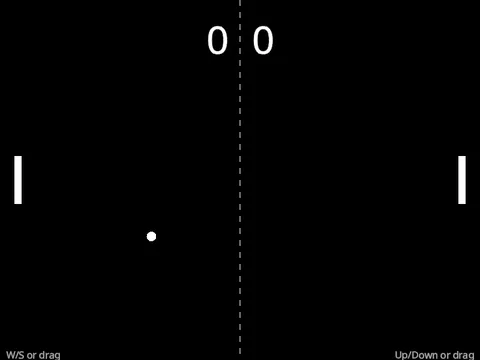
Play it in your browser first: Pong. Then get your own copy and run it:
pip install --pre "simvx[examples]"
simvx examples copy tutorials_pong --to pong
python pong/main.py
From a source checkout, prefix commands with uv run. Read the
whole file on the source host.
1. Sizes and sides
Everything comes from simvx.core and simvx.core.ui; App from simvx.graphics opens the
window. A few constants size the pieces, and a StrEnum names the two sides of the court:
import math
import random
from enum import StrEnum

from simvx.core import Axis1D, CanvasLayer, Controller, Input, Key, Node2D, Property, Signal, Vec2
from simvx.core.ui import Anchor, Label
from simvx.graphics import App

PADDLE_W, PADDLE_H = 12, 80
PADDLE_INSET = 30  # distance from each paddle to its end of the court
BALL_R = 8
MAX_RALLY_SPEED = 900.0
WHITE = (1.0, 1.0, 1.0, 1.0)


class Side(StrEnum):
    LEFT = "left"
    RIGHT = "right"
The court itself has no constant: everything is measured from the window, so the game fits any window size.
2. A paddle
class Paddle(Node2D):
    speed = Property(400.0, range=(100, 800))
    action = Property("p1_move")
    side = Property(Side.LEFT)

    def on_update(self, dt: float):
        court_w, court_h = self.viewport_size
        self.position.x = PADDLE_INSET if self.side == Side.LEFT else court_w - PADDLE_INSET
        step = self.speed * dt
        move = Input.value(self.action) * step
        if not move and (target := self.held_pointer_y(court_w)) is not None:
            move = max(-step, min(step, target - self.position.y))
        self.position.y = max(PADDLE_H / 2, min(court_h - PADDLE_H / 2, self.position.y + move))

    def held_pointer_y(self, court_w: float) -> float | None:
        """The y of the first pointer held on this paddle's half of the court."""
        for pointer in Input.pointers.values():
            x, y = pointer.position
            if pointer.contact and (x < court_w / 2) == (self.side == Side.LEFT):
                return y
        return None

    def on_draw(self, renderer):
        renderer.rect((-PADDLE_W / 2, -PADDLE_H / 2), (PADDLE_W, PADDLE_H), fill=WHITE)
Node2Dis the base for 2D game objects.on_update(dt)runs every frame, withdtin seconds.Propertydeclares a value the editor can show and a scene can save, with optional range validation. One class serves both players: onlyactionandsidediffer.self.viewport_sizeis the size of the window in the node’s units, so each paddle keeps its distance from its own end of the court whatever the window is.Input.value(self.action)reads the paddle’s action as a float from -1.0 (up) to 1.0 (down), from whichever device is in use.With the action at rest, the paddle closes on a pointer held on its half of the screen.
Input.pointersholds the mouse, every finger and a pen, andcontactis true for a finger on the glass or the mouse with its button held, so two fingers can drive both paddles at once.on_draw(renderer)draws in the node’s own space:(0, 0)is the node’s position, so moving the node moves the drawing.rect()andcircle()takefill=andstroke=,line()takesstroke=, andtext()takesfill=.
3. The ball
class Ball(Node2D):
    speed = Property(350.0, range=(200, 600))
    scored = Signal()

    def on_ready(self):
        self.serve()

    def serve(self):
        """Start from the middle of the court at a random shallow angle."""
        self.position = self.viewport_size / 2
        angle = random.uniform(-math.pi / 4, math.pi / 4)
        self.velocity = Vec2(math.cos(angle) * random.choice([-1, 1]), math.sin(angle)) * self.speed

    def on_update(self, dt: float):
        court_w, court_h = self.viewport_size
        self.position += self.velocity * dt
        if self.position.y < BALL_R:
            self.position.y = BALL_R
            self.velocity.y = abs(self.velocity.y)
        elif self.position.y > court_h - BALL_R:
            self.position.y = court_h - BALL_R
            self.velocity.y = -abs(self.velocity.y)
        if self.position.x < 0:
            self.scored.emit(Side.RIGHT)
            self.serve()
        elif self.position.x > court_w:
            self.scored.emit(Side.LEFT)
            self.serve()

    def on_draw(self, renderer):
        renderer.circle((0, 0), BALL_R, fill=WHITE)
The ball moves itself and bounces off the top and bottom walls. When it leaves the left or right
edge, it emits its scored signal with the side that won the point and serves again. A signal is
declared on the class and fired with emit. The ball never touches the score: whoever cares
connects to the signal.
4. The game
The root node declares the actions and builds the scene:
class PongGame(Node2D):
    input_context = {
        "p1_move": [Axis1D(low=Key.W, high=Key.S), Controller.LEFT_Y],
        "p2_move": [Axis1D(low=Key.UP, high=Key.DOWN), Controller.RIGHT_Y],
    }
    left_score = Property(0)
    right_score = Property(0)

    def on_ready(self):
        middle = self.viewport_size.y / 2
        self.left_paddle = self.add_child(Paddle(action="p1_move", side=Side.LEFT, position=(0, middle)))
        self.right_paddle = self.add_child(Paddle(action="p2_move", side=Side.RIGHT, position=(0, middle)))
        self.ball = self.add_child(Ball())
        self.ball.scored.connect(self.on_scored)
        self.add_child(controls_help())
An input_context on the root declares the game’s actions for the whole tree while this scene is
running. An action is typed by its bindings: Axis1D(low=Key.W, high=Key.S) composes two keys
into one signed float, and a controller axis such as Controller.LEFT_Y is another source of the
same float. When both are in use, the one further from rest wins.
add_child() attaches a node to the tree, where it is updated and drawn automatically.
connect() routes the ball’s scored signal to the game’s handler. The board is drawn from
self.viewport_size, so it follows the window.
controls_help(), at the end of the file, builds the key hints along the bottom.
5. Keeping score
def on_scored(self, side: Side):
    if side == Side.LEFT:
        self.left_score += 1
    else:
        self.right_score += 1
The scores are Properties, so changing one redraws the board. The 2D renderer re-runs on_draw
only when a Property or the node’s transform changes; a node that animates from other state sets
dynamic = True (see Node system).
6. Hitting the ball
def on_update(self, dt: float):
    ball = self.ball
    for paddle, direction in ((self.left_paddle, 1.0), (self.right_paddle, -1.0)):
        offset = ball.position - paddle.position
        if abs(offset.x) < PADDLE_W / 2 + BALL_R and abs(offset.y) < PADDLE_H / 2 + BALL_R:
            angle = offset.y / (PADDLE_H / 2) * math.pi / 3
            speed = min(ball.velocity.length() * 1.05, MAX_RALLY_SPEED)
            ball.velocity = Vec2(math.cos(angle) * direction, math.sin(angle)) * speed
            ball.position.x = paddle.position.x + direction * (PADDLE_W / 2 + BALL_R + 1)
Each frame the game tests each paddle against the ball with an axis-aligned overlap. On a hit it
sends the ball back at an angle set by where it struck the paddle, so players can aim, and 5%
faster, up to MAX_RALLY_SPEED. The cap matters: the test runs once a frame, so a ball moving
further than the paddle’s width in one frame would pass straight through it.
Hand-written collision keeps every moving part visible. A game with more shapes would use the physics nodes instead, as Your first 3D game does.
7. Drawing the court
def on_draw(self, renderer):
    court_w, court_h = self.viewport_size
    for y in range(0, int(court_h), 20):
        renderer.rect((court_w / 2 - 1, y), (2, 10), fill=(0.31, 0.31, 0.31))
    renderer.text(str(self.left_score), (court_w / 2 - 20, 20), fill=WHITE, scale=4, align="right")
    renderer.text(str(self.right_score), (court_w / 2 + 20, 20), fill=WHITE, scale=4)
The net and the scores are measured from the centre of the window. align="right" puts the left
score’s right edge on the given x, so it stays clear of the net at any number of digits.
Finally, App opens the window and runs the game:
if __name__ == "__main__":
    App(title="Pong", width=800, height=600).run(PongGame())
Next steps
Copy the finished game:
simvx examples copy tutorials_pong --to pong(source).Change a paddle’s
speedorMAX_RALLY_SPEEDand play again.Your first 3D game: a first 3D game, with physics bodies, a timer and an end screen.
From monolithic to composed: split a game into small nodes.
Examples Gallery: every example, from sprites and tilemaps to particles and navigation.